Showing posts with label javascript. Show all posts

Tuesday, September 27, 2016

Developing Nodejs App Using Eclipse

Until today I was doing npm init to initialize my nodejs project and install dependencies. But I have figured out way to write nodejs code using my favorite tool eclipse.

There is a plugin called Nodeclipse which will help you to do that stuff. I will go through step by step to run first nodejs project using elipse.

Installing Nodeclipse to your existing eclipse tool

Open your eclipse marketplace. 

HELP >> Eclipse Marketplace


Click on "Install" to install your plugin.

Restart your eclipse

Deploying Express Nodejs Application

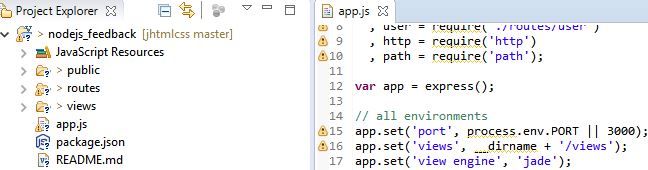
Once you restart you eclipse, create a new nodejs project or new nodejs Expressjs Project. In my case, I have created Nodejs Expressjs Project.


Now, right click on the app.js view, select run as Nodejs Application. Your nodejs app is up and running with your favorite tool eclipse.

Thursday, November 5, 2015

Making a fullscreen image slider

We already know videos in webpage offers a button to make the video view-able in full-screen mode. It will be really nice if we can make our high quality image slider to be presented in full-screen.

In this small tutorial we will see making the slider full-screen.

To make my demo easy, I took basic image slider from bootstrap.


Wednesday, November 4, 2015

Monday, November 2, 2015

Serving first HTML with node.js

Last week I have written hello world with node js i.e how to write first javascript file on the server side and how to execute it with node.js

In this tutorial, we will see how to start our own server and throwing first html with it. This is achived in two steps


Sunday, November 1, 2015

Few interesting arts with sketch.js

I just found these interesting arts with sketch.js. This minimal footprint javascript library lets you to code fun things in your web designs.

You can do unlimited things with sketch javascript library.

Below are few examples done with sketch.js

Saturday, October 31, 2015

Do not make your webpage to load all images at once. Tip to speed up website

User experience is very important aspect in making a web application. One of the important factors is improving your website page load time. Where do many applications fail to make good user experience ?

  •  Trying to load lot of content at once.
  •  Loading higher dimension ed images than required by your styles
  •  Loading images before even they actually require on the screen.

Friday, October 30, 2015

Amazing Javascript work done by this website

Google has released an amazing tool to look top costume searches happening for this Halloween. The CSS effects with javascript are interesting. Thought of sharing this.

This kind of presentation would be possible with javascript library Threejs .

Thursday, October 29, 2015

Hello World with node.js

I have been hearing a lot from programmers about node.js. A server side javascript framework which can accomplish all the server side tasks. Lets see how to use node.js


Friday, October 9, 2015

Floating your sidebox between two points, Inspired by Google

I have seen google pagespeed insights floating the mobile or desktop screenshot on the sidebar between only certain points.
I just figured it out how to do it. And here is the tutorial explaning to make your website sidebar widget float between two limits.

Thursday, October 8, 2015

Offer something when user is moving out of your page

What most of the publishers are doing to convert their new visitors as returining visitors? They offer something when users visit the site.
Now, when do they offer discount or free stuff, it depends from business to business, either when user spends some time on a page or
user visiting couple of pages or when he/she is leaving the website.

Wednesday, September 30, 2015

A Simple Mobile Menu

I have created a simple mobile menu using html, javascript(jquery) and css. I have used similar mobile menu for couple of websites.


Below is how I created the menu. You can also edit and play with the code here https://jsfiddle.net/mannemvamsi/j9m571ve/

1. HTML for the menu(Navigation)


<div class="mobile-menu-wrapper">
    <div class="mobile-menu-control">
        <div class="bar"></div>
        <div class="bar"></div>
        <div class="bar"></div>
    </div>
<div class="mobile-menu">
    <ul>
        <li ><a href="#"><div class="header item-height" ><strong>The Main 1</strong></div></a>
            <ul>
                <li><a href="#"><div class="item-height">Sub Item</div></a></li>
                <li><a href="#"><div class="item-height">Sub Item</div></a></li>
            </ul>
        </li>
        <li ><a href="#"><div class="header" ><strong>The Main 2</strong></div></a>
            <ul>
                <li><a href="#"><div class="item-height">Sub Item</div></a></li>
                <li><a href="#"><div class="item-height">Sub Item</div></a></li>
            </ul>
        </li>
    </ul>
</div>
</div>


2. Add CSS to the html document( basically adding css only to above navigation part)


.mobile-menu-wrapper{
    position:fixed;
    left:-220px;
    width:260px;
    cursor:pointer;
}

div.mobile-menu {
    width:210px;
   
    float:left;
    background-color:#222;
}
.mobile-menu ul {
    list-style:none;
    margin:0;
    padding:0px;
   
}
.mobile-menu ul ul li {
    padding-left:8px;
   
}
.mobile-menu li {
    margin:0;
    padding:0;
}
.mobile-menu li, .mobile-menu li a {
    color:#fff;
    font-family:calibri, sans-serif;
    text-decoration:none;
}
.mobile-menu li li:hover {
    background-color:#111;
}
.mobile-menu .item-height{
    padding:10px 2px;
}

.mobile-menu-control {
    float:right;
    //border:1px solid green;
    cursor:pointer;
    background-color:#222;
    padding:5px;
}
.mobile-menu-control .bar {
    width:25px;
    margin:4px 0;
    border:2px solid #fdbd12;
}
.mobile-menu .header {
    color:#fdbd12;
    padding-left:4px;
    width:100%;
}


3. Use Jquery for actions


$(function() {
    var wrapper = $(".mobile-menu-wrapper");
    var mobileMenu = $(".mobile-menu");
    var mobileMenuWidth = mobileMenu.width();
    $(".mobile-menu-control").bind("click",function() {
       
        if(mobileMenu.hasClass("opened-menu")) {
           
           $(".mobile-menu-wrapper").animate({
               left:-(220)
              
           });
            mobileMenu.removeClass('opened-menu');
        }
        else
        {
           $(".mobile-menu-wrapper").animate({
               left:0
           });
            mobileMenu.addClass('opened-menu');
        }
    });
})
Fiddle is available for the same here : https://jsfiddle.net/mannemvamsi/j9m571ve/

Wednesday, April 29, 2015

Testing HTML on Real Devices - No wires required

Testing on Real devices

Making html pages or templates should be easy. If you are beginner w3schools.com might be the right place to start with. It is not just only developing things, testing is another important aspect of any our work.

Say if you have developed a simple html layout or a page, and you tested it using chrome browser and it looks so good and when you test it on other browsers like firefox and IE, there could few things that you would correct and make it works well on these browsers.

Friday, April 24, 2015

Do Something new with these Jquery plugins and Javascripts

Web designing is always been a challenge for web designers and developers. Unless you have some good tools to work, it is most likely difficult to develop great UI.

Below are some tools that might help you to come up with some great designs to your apps or websites.

Tuesday, April 21, 2015

Top CSS frameworks for web developers

I know the web developers like to code and also they would love things like readily made css frameworks that will ease their development process.

So, I collected some of the most popular CSS frameworks which can help beginners and web designers.


Friday, April 17, 2015

Top 10 Javascript Frameworks 2015

My favorite part in any web application development is working on Javascript. A script is usually something which you can change instantly and run it, you do not need any deployment stuff. In this post I listed down some of the best javascript frameworks that I used for my personal projects.


Wednesday, April 15, 2015

How to use javascript settimeout to call functions in sequence


Using Javascript setTimeout to call javascript functions is easy. This simple tutorial explains the usage of javascript setTimeout function

Wednesday, March 4, 2015

A Simple Jquery ajax example - HTML form submission made easy


You might be wondering about using jquery ajax method. Here is a simple Jquery ajax post example that explains easy way to send data to server and fetch data from server asynchronously.

Jquery ajax tutorial for beginners


1. Include Jquery in your html header 
    <script src="http://code.jquery.com/jquery-1.10.2.min.js"></script>

2. Create a html form to submit sample data asynchronously 
    <form id ="myForm">
      ENTER YOUR NAME   <input id ="myInput" name="myInput"/>
      <button type="submit" id="submit">SUBMIT</button>
   </form>

3. Create jquery method $.ajax to submit data to server

     In your javascript add function like this
      $.ajax();   // primary method
     It takes some arguments like
        a) Jquery ajax action-type (type), eg: post, get etc..
        b) file to call (url ),
        c) data to send (data),
        d) what to do upon success ajax call (success)
        e) what to do upon server error (error)

      So, adding up the arguments, it finally looks like this
      $.ajax(
           {
             type: "post",
             url :   "/path/to/my.php",
             data : $("#myForm").serialize();
             success : function(data) {
                      // alert(data);
                            } ,
              error : function(data) {
                   // alert('Report Server Error');
                         }
           }
         );
    
4. Call ajax on clicking the submit button 

   So, our jquery ajax method is ready to send data to server.
   NOTE : $("#myForm").serialize() method will send all the form elements to server.

      Create handler to submit button 
      $("#submit").click(function () {
                // add ajax function here.
        });
      It should look like 

      $("#submit").click(function () {
           $.ajax(
           {
             type: "post",
             url :   "/path/to/my.php",
             data : $("#myForm").serialize();
             success : function(data) {
                       // alert(data);
                            } ,
              error : function(data) {
                       // alert('Report Server Error');
                         }
           }
         );
        });
 
5. Handling form elements on the server side

  On your server side PHP or servlet get the form elements

   In our example we passed our server file as "/path/to/my.php". Jquery ajax will send form to that location.

 if it is PHP, use
                     $_POST["myInput"];
 if it is jsp/servlet use
                     request.getParameter("myInput");

 do what ever you want on the server side and you can send signal saying either it is good or bad or you can throw any exception.

   Throwing exception will be treated as error by $.ajax();

So, what I have done in my example php file is
       echo $_POST["myInput"];

6. Once it is success (Jquery ajax success)
    

  It is all happy on the server side, the $.ajax parameter success function is invoked.

  There is another important thing is to block default form submission.

  Because, html form is submitted to server when you click on submit button.
   In order to avoid such form submissions, you can say event.preventDefault(); Use this on button click

     So, our final form submission using jquery will look like this.
  $("#submit").click(function (e) {
           e.preventDefault();
           $.ajax(
           {
             type: "post",
             url :   "/path/to/my.php",
             data : $("#myForm").serialize();
             success : function(data){
                      // alert(data);
                            } ,
              error : function(data) {
                     // alert('Report Server Error');
                         }
           }
         );
        });
 

Wednesday, December 25, 2013

How to validate simple html form using jquery validate plugin

In this example, I have created a simple form which has user name and password as input fields.
<html>
<head>
<script src="http://code.jquery.com/jquery-1.10.2.min.js"></script>
// Validate plugin which I got from http://plugins.jquery.com/validation/
<script src="jquery.validate.js"></script>
</head>

<body>
<script>
$(function() {
 $("#form1").validate({
                // Use this one to place the error
  errorLabelContainer: $("#form1 div.errorHolder")
 });
});
</script>
<form id="form1" action="">
  <p>
   <label>Username</label>
   <input name="user" title="Please enter your username " required minlength="5">
  </p>
  <p>
   <label>Password</label>
   <input type="password" maxlength="12" name="password" title="Please enter your password" required minlength="5">
  </p>
                 // Div tag to hold error messages
  <div class="errorHolder">
  </div>

  
   <input class="submit" type="submit" value="SUBMIT"/>
  
</form>
</body>
</html>


Simple sign in form example

You can copy the above code and save it in a file .html to test it.


Sunday, December 22, 2013

How to close jquery menu on page scroll down

<html>
<head>
<link rel="stylesheet" href="http://code.jquery.com/ui/1.10.3/themes/smoothness/jquery-ui.css">
  <script src="http://code.jquery.com/jquery-1.9.1.js"></script>
  <script src="http://code.jquery.com/ui/1.10.3/jquery-ui.js"></script>

</head>


<!-- STYLE-->
<style>
#main-nav{
    width:150px;
}
body{
    height:1000px;
   
}
</style>


<!--SCRIPT-->
<script>
$(function() {
    $( "#main-nav" ).menu();
  });

 <!--Fire on scroll event and collapse all menu active items -->
window.onscroll = function (event) { 
  $( "#main-nav" ).menu( "collapseAll", null,true );
}
</script>


<body>
<div id="sub-link-bar"> </div>

 <div id="wrap">

 <div class="roundfg">
 <ul id="main-nav">
     <li><a class="main-link" href="#">Home</a>
         <ul class="sub-links">
         <li><a class="main-link" href="#">Home</a></li>
         </ul>
     </li>
     <li><a class="main-link" href="#">Tutorials</a>
         <ul class="sub-links">
             <li><a href="#" >Design</a> </li>
             <li><a href="#">HTML &amp; CSS</a> </li>
             <li><a href="#" >Other</a> </li>
             <li><a href="#">PHP</a> </li>
             <li><a href="#">Ruby</a> </li>
             <li><a href="#">Site Builds</a> </li>
             <li><a href="#">Tools &amp; Tips</a> </li>
             <li class="cat-item cat-item-35"><a href="#">Wordpress</a> </li>
         </ul>
 </li>


 <li><a class="main-link" href="#">Videos</a>
 <ul class="sub-links">
 <li><a href="#">Screencasts</a> </li>
 </ul>
 </li>
 <li><a class="main-link" href="#">About</a>
 <ul class="sub-links">

 </ul>
 </li>
 </ul>
</div></body>
</html>

SEE ALSO

Simple Sign-in form using HTML and CSS

How to place text inside a circle using CSS


I also have created the fiddle for the same http://jsfiddle.net/3XED6/